← Journal
Last updated on

AI Companion Privacy: What You Need to Check


TL;DR:

  • Most consumer AI companion apps store user data on servers, often review conversations, and lack legal privilege protections. To protect privacy, users should review model training clauses, confirm deletion processes with timelines, and minimize personal sharing. Mistrix encrypts all sensitive data client-side, offering a privacy-first adult companionship experience without trading privacy for personalization.

Most consumer AI companion apps are not fully private by default. Your chat transcripts are typically stored on company servers, may be reviewed by human moderators, and can be used to train future models. No legal privilege protects those conversations the way attorney-client or doctor-patient communications are protected. Before you type another message, check the app’s model-training clause, confirm there is a deletion process with a stated timeline, and use the minimum personal details necessary.

Three immediate actions worth taking right now:

  • Check the training clause. Search your app’s privacy policy for “model training,” “improve our services,” or “de-identified data.” If you find permissive language with no opt-out, your chats may be feeding the next model update.
  • Verify deletion. Look for an account-deletion page and confirm it states a specific timeline. “We will delete your data” with no timeframe is not a guarantee.
  • Minimize what you share. Use a separate email address, skip linking social accounts, and avoid uploading identity documents. Regulations like CCPA and GDPR give you rights over personal data, but only over data you have actually shared.

Platforms like Mistrix are built around a different model, where client-side encryption means the server structurally cannot read your content. Most apps are not built that way.


Table of Contents

What data do AI companion apps actually collect?

The collection surface is wider than most users expect. Beyond the obvious chat transcript, most AI companion apps store a range of data categories that compound over time:

  • Chat transcripts and memory labels, every message, plus any named memories the app creates (“user prefers X,” “user mentioned Y”)
  • Uploaded media, photos, audio clips, and generated images tied to your account
  • Profile and onboarding data, age, preferences, fetish interests and hard limits you disclosed during setup
  • Telemetry and usage logs, session timestamps, feature interactions, and how long you spent in each conversation
  • Device identifiers and IP address, device model, OS version, advertising ID, and your approximate location
  • Payment information, billing details processed through payment processors, sometimes linked to your usage profile
  • Analytics identifiers, third-party SDKs (Amplitude, Firebase, Mixpanel) that track behavioral patterns across sessions

The non-obvious metadata matters as much as the content itself. Conversation timestamps reveal when you use the app and for how long. Content tags and memory labels created by the AI can encode sensitive preferences even if you never stated them explicitly.

App permissions expand this surface further. Granting camera or microphone access, syncing contacts, or linking a social account hands the app data it would otherwise never see. Uploading a session photo through a feature like Mistrix’s AI Studio is a deliberate, bounded action. Granting blanket camera access is not.

Smartphone on desk showing privacy permissions glow

Pro Tip: Before installing any AI companion app, open the app store’s privacy nutrition label. It lists every data category the developer declared, a quick scan takes 30 seconds and often reveals third-party analytics SDKs the privacy policy buries in paragraph 14.


How platforms actually use your conversation data

Runtime response generation is the obvious use: the model reads your message and replies. What happens after that reply is where privacy diverges sharply across platforms.

  • Personalization and memory, the app stores summaries of past conversations to make future responses feel consistent and personal. This is the feature most users want, and it requires persistent storage.
  • Safety and moderation pipelines, automated classifiers scan messages for policy violations. When the classifier flags content, a human reviewer may read the raw conversation.
  • Model training, platforms commonly use conversation data to fine-tune or retrain their models, often under broad “improve our services” language.
  • Third-party sharing, analytics SDKs, advertising networks, and cloud infrastructure providers each receive some slice of your data, even when the app does not sell it outright.

The distinction between first-party use (improving the same service you use) and third-party sharing (sending data to advertisers or data brokers) is real and worth checking. Free apps that monetize through advertising have a structural incentive to share behavioral data. Paid subscription models tend to offer more explicit deletion and export flows because their revenue does not depend on data monetization.

Pro Tip: When a policy says “we may share de-identified data with partners,” that phrase does not mean anonymous. Re-identification from behavioral patterns is well-documented. Treat “de-identified” as a legal hedge, not a privacy guarantee.


Effective consent is specific, upfront, and reversible. A checkbox buried in a 6,000-word terms of service is not consent in any meaningful sense. Here is what a well-designed app provides:

  • An explicit disclosure at onboarding stating whether your chats will be used for model training, with a clear opt-out toggle
  • A memory management panel where you can view, edit, or clear stored memories
  • A data export function (downloadable archive of your conversations and profile)
  • An account deletion page with a stated completion timeline
  • A cookie preference center for web clients
  • Two-factor authentication for account security

To find these controls in a typical app: start in Settings → Privacy or Account → Data. If neither exists, search the app’s help center for “delete my data” or “export.” If that fails, the privacy policy should list a dedicated privacy contact email.

The limit of consent is real, though. Apps frequently use vague legal language such as “we may use” or “de-identified” that permits broad reuse even after you click “I agree.” Broad ToS clauses can survive your opt-out of specific toggles because they apply to data already collected.

Steps to exercise your rights right now:

  1. Open the app’s privacy policy and search for “training” and “opt out.”
  2. Navigate to Settings and locate any memory or data-sharing toggles. Disable what you do not want.
  3. Request a data export before making any changes, so you have a record.
  4. Submit a formal deletion request through the in-app tool or the privacy email. Screenshot the confirmation.
  5. For CCPA (California) or GDPR rights, use the app’s designated rights-request form or email, these are legally required to exist.

When should you not use an AI companion?

Some contexts make AI companion use genuinely risky, not just imperfect. Avoid sharing the following through any companion app:

The FTC launched a formal inquiry into AI chatbots acting as companions, specifically examining safety practices and data uses for children and teens. Universities and enterprises have issued similar restrictions, prohibiting the use of consumer AI companions for work involving confidential or regulated data.

For consent-first design in adult contexts specifically, ethical AI intimacy frameworks require explicit hard limits and safe words before any session begins, a design standard that most consumer apps do not meet.


Deletion is not erasure. When you delete your account, most platforms remove your profile from their active database. What they typically do not remove: backup copies, compliance logs, and model weights that were already trained on your data.

Retention windows vary widely across apps. Documented examples include 28 days (Nomi), 60 days (Replika), and up to five years after account deletion (Chai, per its privacy policy). Training archives may persist indefinitely because the model weights themselves are not “your data” in a legal sense.

Conversations with AI companions do not receive legal privilege, and platforms can use conversation data for service improvement, training, or commercial purposes as their terms allow. That means a civil lawsuit, a law enforcement request, or a regulatory subpoena can reach your chat history. The platform has no legal obligation to resist that request the way a lawyer or doctor would.

Warning: If you receive a legal notice or believe your companion chat data may be subject to discovery, export your data immediately, preserve the export, and consult an attorney before submitting any deletion request. Deleting data after receiving a legal hold notice can constitute spoliation.


Which security measures actually protect your content?

“Encrypted” on a marketing page can mean three very different things:

Encryption tier Who can read your content Typical use
TLS (transport) Anyone with server access Standard across all apps
Server-side at rest Platform staff with key access Most AI companion apps
Client-side / E2EE Only you (server cannot decrypt) Rare; gold standard

End-to-end or client-side encryption is rare. Most apps rely on TLS in transit and server-side encryption at rest, which protects against external attackers but leaves content readable by platform employees, moderation teams, and anyone who obtains the server keys through a breach or legal process.

Hands typing on keyboard in cozy dark office

True client-side encryption means the encryption key never leaves your device. The server stores only ciphertext it cannot read. This is the architecture Mistrix uses: a user-held PIN encrypts sensitive data client-side, so the server is structurally unable to access personal content.

Beyond encryption, check for:

  • Published third-party security assessments, independent audits carry more weight than self-reported claims

When an app claims “encrypted” or “private,” ask: encrypted at what layer, and who holds the key?


How to evaluate any AI companion’s privacy policy quickly

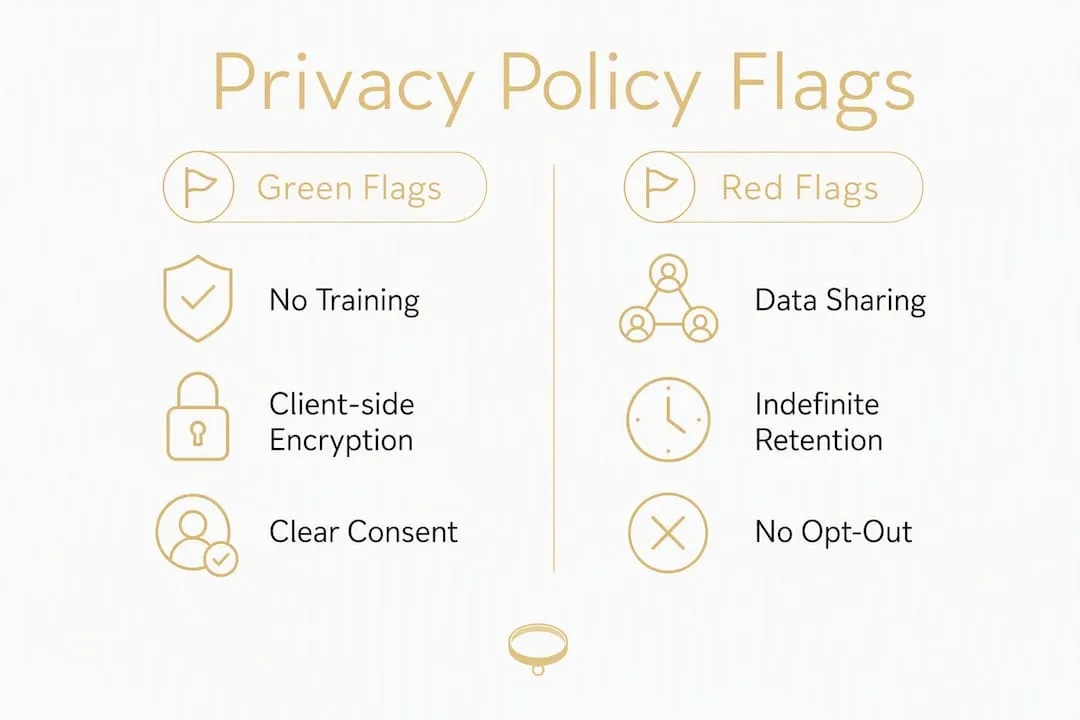
Four clauses in any privacy policy reliably predict whether a platform treats your conversations as ephemeral or as a long-term training asset: the model-training clause, the third-party sharing clause, the retention period, and the deletion/export mechanics.

Infographic showing privacy policy evaluation flags

Policy element Green flag Red flag
Model training “We do not use content to train models” or explicit opt-out toggle “We may use data to improve services” with no opt-out
Third-party sharing Named categories only (infrastructure, payment) “Trusted partners” with no list
Retention period Specific days/months stated “As long as necessary”
Deletion Confirmed within X days, with written confirmation “We will make reasonable efforts”
Human review Disclosed, limited to safety cases Not mentioned at all
Privacy contact Named email or form Generic support address only

Prioritize explicit, operational statements over marketing claims. “Privacy-first” on a landing page means nothing without a corresponding clause in the legal document. A subscription model with no advertising revenue is structurally more aligned with user privacy than a free app that monetizes behavioral data.

The ranking of assurance from strongest to weakest: client-side/E2EE with no-training commitment > paid subscription with explicit opt-out > free with opt-out toggle > free with no opt-out.


What research shows about AI companion privacy in practice

A multi-app review by CompanionWise scored 27 apps across 23 safety dimensions. Only two of the 11 most popular apps scored above a D grade. Pi AI was the top scorer at B/55. The pattern across the rest: vague retention language, no explicit training opt-out, and server-side-only encryption.

Finding Detail
Safety scores Only 2 of 11 popular apps scored above a D across 23 dimensions
Top scorer Pi AI at B/55
Retention range 28 days (Nomi) to 5 years (Chai)
Encryption standard Most apps: TLS + server-side only; client-side E2EE is rare
Training opt-out Majority of apps lack an explicit, accessible opt-out

One practical upgrade available to technically comfortable users: the BYO-API route. Routing chats through a paid model provider API such as Anthropic or OpenAI’s commercial tier carries stronger no-training defaults than most consumer apps, because model providers apply stricter data-use terms to commercial API customers.

For a detailed look at how Mistrix’s privacy engineering decisions were made, the Mistrix devlog documents the product’s privacy-first build decisions in plain language.


Practical steps to protect your privacy right now

Immediate actions (do these today):

  1. Register with a dedicated email address not linked to your real identity.
  2. Export your existing conversation data before changing any settings.
  3. Disable memory or personalization features if the app offers a toggle.
  4. Opt out of model-training data use in Settings → Privacy.
  5. Delete any uploaded photos or documents you no longer need.

Short-term settings (this week):

  1. Enable two-factor authentication on your account.
  2. Review app permissions on your phone and revoke camera, microphone, and contacts access unless you actively use those features.
  3. Reset your advertising ID (iOS: Settings → Privacy → Tracking; Android: Settings → Google → Ads).

Ongoing hygiene:

  1. Run a full data export and account review every 90 days.
  2. Use a privacy-focused browser (Firefox with uBlock Origin, or Brave) for web-based companion clients.
  3. Consider a VPN to mask your IP address from the app’s analytics pipeline.

Pro Tip: If you want the strongest no-training guarantee without switching platforms, look for apps that support a BYO-API mode. Routing through your own paid Anthropic or OpenAI API key typically applies that provider’s commercial no-training defaults to your sessions, independent of the app’s own policy.

The trade-off when opting out of memory and training: the companion loses continuity. It will not remember your preferences, past sessions, or established rituals between conversations. For users who want both privacy and persistence, client-side encryption (where the server stores encrypted memory it cannot read) is the only architecture that delivers both.

To exercise GDPR or CCPA rights: export first, then submit a formal deletion request through the app’s designated form or privacy email. Track the confirmation and note the date. Under CCPA, businesses have 45 days to respond; under GDPR, 30 days.


Key Takeaways

Most AI companion apps store your chats on servers staff can access, lack explicit training opt-outs, and offer no legal privilege protection, making client-side encryption and a clear deletion policy the two most important features to verify before you share anything sensitive.

Point Details
Check the training clause Search the privacy policy for “model training” and confirm an opt-out exists before using the app.
Verify deletion timelines A real deletion policy names a specific number of days; vague language is not a guarantee.
Prefer client-side encryption Server-side encryption is standard but staff-readable; only client-side E2EE keeps content from the platform.
No legal privilege applies Companion chats can be subpoenaed or reviewed by moderators, never share legally sensitive information.
Mistrix’s privacy architecture Mistrix encrypts sensitive data client-side with a user-held PIN the server never sees, pairing privacy with persistent personalization.

Mistrix: privacy-first adult AI companionship

If you have read this far, you know what most companion apps get wrong: server-readable storage, vague training clauses, and no real deletion guarantee. Mistrix is built around the opposite premise. Every piece of sensitive data is encrypted client-side with a PIN only you hold. The server stores ciphertext it cannot read. That is not a marketing claim, it is an architectural constraint.

Beyond encryption, Mistrix’s consent-first onboarding requires you to set hard limits and a safe word before any session begins, so your boundaries are enforced at the generation level, not just noted in a policy. The subscription model means your data is never the product. Premium and Premium Plus plans unlock unlimited sessions, custom Domina creation, AI-generated images, and session exports, all within the same privacy architecture.

For adults who want a personalized, femdom or BDSM companion experience without trading their privacy for it, Mistrix is the place to start.


FAQ

Are AI companion chats legally private?

No. Conversations with AI companions carry no attorney-client, medical, or any other legal privilege. They can be subpoenaed, reviewed by human moderators, or exposed in a data breach.

What does “client-side encryption” mean for a companion app?

Client-side encryption means your data is encrypted on your device before it reaches the server, using a key only you hold. The platform cannot read your content even if compelled by a court order or breached by an attacker. Mistrix uses this architecture with a user-held PIN.

How do I opt out of AI model training?

Open the app’s privacy settings and search for a “model training” or “data use” toggle. If none exists, check the privacy policy for an opt-out email address. Under CCPA, California residents can formally request that their data not be used for certain commercial purposes.

How long do AI companion apps keep my data after I delete my account?

Retention varies widely. Documented examples range from 28 days (Nomi) to five years (Chai) after account deletion, depending on the platform. Training-derived model weights may persist indefinitely because they are not classified as “your data” under most policies.

Which AI companion apps have the strongest privacy protections?

CompanionWise’s multi-app review found only two of 11 popular apps scored above a D on 23 safety dimensions. Look for apps with explicit no-training commitments, client-side encryption, and specific deletion timelines rather than relying on marketing claims alone.


Primary regulators and frameworks:

  • FTC, AI Companion Inquiry: the FTC’s formal inquiry into companion app safety and data practices, with a focus on children and teens
  • California Attorney General, CCPA: your rights to access, delete, and opt out of data sale under California law
  • FTC Consumer Information, Privacy: plain-language guidance on filing complaints and understanding your rights

Policy sections to search in any app:

  1. “Model training” or “train our models”, look for an explicit opt-out
  2. “Third-party sharing” or “partners”, look for a named list, not a category
  3. “Retention” or “how long we keep”, look for a specific number of days
  4. “Delete your account” or “data deletion”, look for a timeline and confirmation process
  5. “Human review” or “content moderation”, look for disclosure of when humans read chats

How to find the privacy contact in any app:

  • Check Settings → Privacy → Contact or Help → Privacy Request
  • Search the app store listing for a “Privacy Policy” link, which must include a contact method under CCPA and GDPR
  • Email the address listed in the policy’s “Contact Us” section with the subject line “Privacy Rights Request”

Filing a complaint:

  1. For US users, file with the FTC at reportfraud.ftc.gov.
  2. California residents can file with the California Privacy Protection Agency at cppa.ca.gov.
  3. Expect a response within 45 days for CCPA requests and 30 days for GDPR requests.

This article is general information, not legal advice. Confirm current rules with the relevant regulator or a qualified privacy attorney before taking formal action.