

A true zero-logging policy means your AI prompts and the responses you get back are never written to persistent storage. No database entry, no backup, no record a support agent could pull up later. But that promise only holds if specific technical settings and contract terms are actually in place. Most AI products default to some logging, whether for abuse monitoring, feature support, or debugging.
Before you trust any vendor’s claim, check one thing first: does their Data Processing Agreement (DPA) explicitly state zero data retention, and can you turn on that mode through an API flag or account setting? If the answer is vague, treat the marketing language with suspicion.
- Zero-logging (also called zero-data-retention or ZDR) means prompts and outputs are not persisted anywhere after the response is generated.
- The promise is conditional. Features like web search grounding, file uploads, or session memory can quietly reintroduce storage unless you disable them.
- Your first move: ask for the exact ZDR clause in the vendor’s DPA and confirm which API settings you need to flip to activate it.
Key Takeaways
A zero-logging policy only holds when technical controls, contractual language, and jurisdiction all align. None alone is sufficient.
| Point | Details |
|---|---|
| Definition matters | Zero-logging means prompts and outputs are never written to persistent storage, not just “not used for training.” |
| Verify the DPA | Demand explicit zero-retention language plus sub-processor binding and audit rights, not vague “minimization” wording. |
| Check API defaults | Settings like store=false and disabling grounding features often need manual activation, not automatic enforcement. |
| Reduce your own exposure | Delete uploaded files quickly, skip unnecessary features, and prefer client-side encryption when it’s offered. |
| Mistrix’s structural approach | Client-side PIN encryption keeps sensitive chat and preference data unreadable to the server itself. |
Table of Contents
- How Zero-Logging Policy AI Systems Work Under the Hood
- Why Jurisdiction and Contract Language Decide Whether “Zero” Holds Up
- How Do You Verify a Vendor’s Zero-Logging Claims?
- Settings and Habits That Cut Your Own Retention Risk
- Mistrix’s Approach to Privacy-First Architecture
- Ready to Try an AI Companion Built Around Privacy?
- Sources
- FAQ
How Zero-Logging Policy AI Systems Work Under the Hood
The mechanics come down to a simple distinction: does your data touch a disk, or does it stay in memory? RAM-only processing means the model reads your prompt, generates a response, and clears that data from active memory once the request finishes. No copy survives a server restart. Persistent storage, by contrast, writes data to a hard drive, a log file, or a database, where it can sit for days, months, or indefinitely depending on retention settings.
Here’s where most “private” AI tools quietly fall short of a real zero-logging policy:
- Abuse monitoring often keeps a rolling window of prompts specifically to detect misuse, separate from any product logging.
- Grounding features (web search, maps, live data lookups) frequently log the query itself, even when the chat content stays private.
- Session resumption requires storing enough context to reload a conversation, which conflicts with a true zero-retention posture.
Real provider documentation backs this up. OpenAI’s zero data retention option for frontier models states that customer content isn’t retained or reviewed by staff in ZDR deployments, though it carves out exceptions for safety processing like CSAM detection. Google’s Gemini API documentation is more blunt: it lists specific features, including grounding and the interactions API, that can log data by default unless you configure them otherwise. Microsoft takes a similar approach with Copilot’s Zero Query Logging setting, which stops web-grounding queries from being stored, though the company notes that admin changes to this setting can take time to propagate across an organization.
The pattern across all three: zero-logging is achievable, but it’s opt-in, feature-specific, and easy to undermine by accident.

Why Jurisdiction and Contract Language Decide Whether “Zero” Holds Up
A vendor can build a perfect zero-retention architecture and still be forced to log data if a court in its home jurisdiction orders it. Legal jurisdiction determines which government can compel a company to comply with warrants, subpoenas, or data requests, and that reach varies enormously depending on where a company is legally headquartered. Vendors based in jurisdictions with stronger baseline privacy protections, such as Switzerland’s data protection framework, are often easier to hold to a strict no-retention standard in practice, since the legal environment itself limits compelled disclosure.
Contract language matters just as much as geography. A DPA that says a vendor “minimizes” data retention is not the same as one that says “zero retention of prompts and responses, with no exceptions beyond legally mandated safety review.” According to VeriRFP’s analysis of zero-retention AI policies, a real commitment needs several specific clauses:
- Explicit language banning prompt and response logging, not just “training data” exclusions.
- Sub-processor binding, so any third party the vendor uses is held to the same standard.
- Audit or attestation rights, letting you verify compliance rather than take it on faith.
- Defined penalties if the vendor violates the retention terms.
Pro Tip: Ask the vendor for their most recent third-party audit or SOC 2 report and check whether it specifically references prompt and response data. Many audits cover infrastructure security but never touch data retention practices at all.
If a company won’t produce contract language this specific, or points you toward a blog post instead of a DPA clause, you’re looking at a marketing claim, not a legal commitment.
How Do You Verify a Vendor’s Zero-Logging Claims?
Verifying a zero-logging promise takes about fifteen minutes if you know which documents to request and which settings to check. Skip the marketing page and go straight to the technical and legal layer.
- Request the DPA’s exact zero-data-retention clause in writing, not a summary from a sales rep.
- Ask for a third-party audit or assurance report, and confirm it explicitly covers prompt and response data.
- Check the API documentation for a retention flag, such as
store=false, and confirm it’s off by default or easy to enable. - Ask whether grounding, web search, or live data features can be disabled, since these often log independently of the main chat pipeline.
- Review the sub-processor list to see who else touches your data and whether they’re bound by the same terms.
A quick technical test helps too: send a handful of benign, clearly nonsensitive prompts, then ask the vendor’s support team to confirm whether anything from that session appears in their internal logs. Developer guidance on data retention consistently emphasizes that defaults should never be assumed. You have to verify them.
A DPA that hedges with words like “minimizes” or “limits” retention, rather than stating “zero” outright, should be treated as a red flag. If the answer to “does this system retain prompt data?” isn’t a clear no, assume it does.
Watch for these warning signs specifically: vague phrases like “industry-leading privacy” with no technical backing, audit reports that only cover infrastructure uptime, and retention windows for “abuse monitoring” that stretch 24 to 30 days or longer, a pattern documented in some providers’ privacy policies for specific features.
Settings and Habits That Cut Your Own Retention Risk
You don’t have to wait on a vendor to lock down your exposure. Several habits reduce your data footprint regardless of what the provider promises on paper.
- Set
store=falsewherever the API or app offers it, rather than assuming logging is off by default. - Skip grounding, web search, or live lookup features when you don’t need them. They often log independently of your main conversation.
- Delete uploaded files immediately after use, or set a short time-to-live if the platform allows it.
- Favor tools offering client-side encryption or PIN-protected local storage, so sensitive content never reaches the server in a readable form.
- Use minimal account metadata. Skip linking real names, phone numbers, or payment details to accounts handling sensitive conversations when the platform allows it.
Pro Tip: If a service offers both a web app and a mobile app, check whether both use the same retention settings. It’s common for mobile apps to cache more data locally for offline access, even when the web version claims zero retention.
Small habits compound. A vendor with imperfect defaults becomes far less risky once you’ve turned off the features that log by default.
Mistrix’s Approach to Privacy-First Architecture
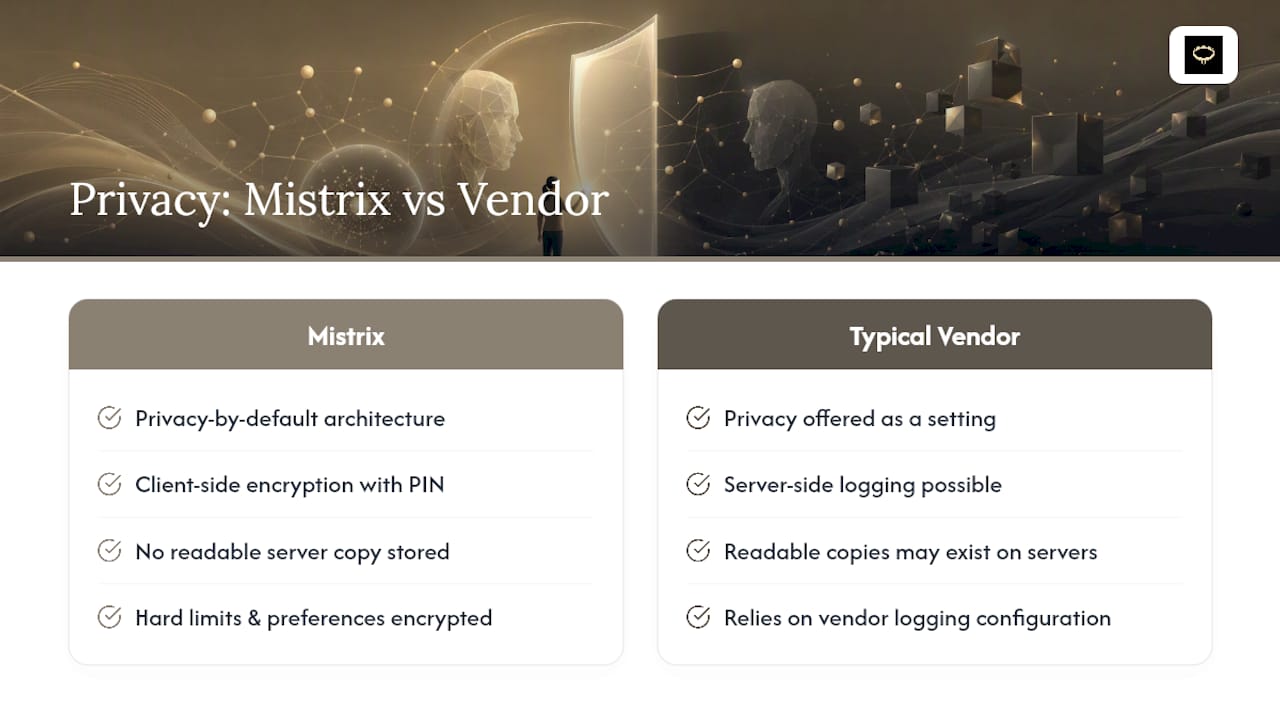
Mistrix built its privacy model around a structural limit rather than a policy promise: sensitive user data, including chat history, fetish preferences, and hard limits, is encrypted client-side with a PIN that only you hold. The server never sees that PIN, which means Mistrix is structurally unable to read your personal content even if compelled to try.
This maps directly onto the verification checklist above:
- Client-side PIN encryption means sensitive data never reaches the server in readable form, not just “protected once it arrives.”
- Onboarding is built privacy-first from the start, with hard limits and consent settings stored under the same encryption model.
- Product details and architecture decisions are documented publicly, including how Mistrix handles chat privacy and its approach to end-to-end encrypted sessions.
Instead of asking you to trust a policy document, the architecture itself removes the server’s ability to read your data.
Ready to Try an AI Companion Built Around Privacy?
If the checklist above left you wanting a service where privacy isn’t a settings toggle but a structural default, Mistrix is built that way from the ground up. Your Domina sessions, hard limits, and preferences are encrypted client-side with a PIN only you hold, so there’s no readable copy sitting on a server waiting for a breach or a subpoena to expose it. That’s a meaningfully different guarantee than a vendor promising to configure logging correctly on your behalf.
Start by reading how the privacy architecture works in practice, then check the pricing page to see what’s included in the free tier versus Premium and Premium Plus. The free tier costs nothing to try, so you can test the onboarding flow, hard limits setup, and encrypted chat before deciding whether to upgrade.
Sources
- OpenAI, offering zero data retention for frontier models
- Microsoft documentation, Zero Query Logging (Copilot)
- VeriRFP, Zero-Retention AI: Why ‘No Training on Your Data’ Isn’t Enough
FAQ
What Does Zero-Logging Mean for AI Prompts?
It means the AI provider never writes your prompts or its responses to persistent storage, so no copy exists after the session ends, provided the vendor’s technical and contractual controls actually enforce it.
Is Zero Data Retention the Same as No Training on My Data?
No. A vendor can promise not to train on your data while still logging and storing it for other purposes, which is why contract language distinguishing the two matters.
How Do I Know if an AI Vendor’s ZDR Claim Is Real?
Request the exact DPA clause, a third-party audit that specifically covers prompt data, and confirmation of which API settings need to be enabled, since vague marketing language without these documents is a warning sign.
Do Grounding and Search Features Break Zero-Logging Promises?
They often do by default. Features like web search grounding frequently log the query itself even when the rest of the conversation stays private, which is why providers like Google document specific steps to disable that logging.
How Does Mistrix Protect User Privacy Without Relying on a Logging Policy Alone?
Mistrix encrypts sensitive data client-side with a PIN the server never sees, so personal content stays structurally unreadable rather than depending solely on a written no-log promise.