
The nsfw mode toggle almost always lives on the platform’s website, not the app, so start there: log into your account on desktop, find “show mature content” or “sensitive content” in your privacy settings, flip it, and then fully close and relaunch the mobile app so it picks up the change. If you only want a lighter touch, look for a separate blur or preview control instead of the main visibility switch.
TL;DR:
- Most platforms require toggling the NSFW or mature content setting via the website before it updates on the mobile app, often needing an app restart for changes to take effect.
- Clearing cache, signing out and back in, or ensuring only one account is active can resolve issues with toggles not sticking or appearing unresponsive.
- Show, blur, and sensitive-content warning controls are distinct, and mixing them can lead to unintended content exposure or restrictions.
- Repeatedly failing to update the setting might indicate account age verification, parental controls, or device restrictions rather than a tech bug.
- Some platforms like Mistrix offer privacy-first options, including consent quizzes, safe words, and client-side encryption, for more granular and secure control over mature content.
Table of Contents
- Six Quick Checks Before You Flip the Switch
- Step-By-Step: Reddit, X, Tumblr, and Grok
- Show, Blur, and Sensitive-Content Warning Aren’t the Same Thing
- Why the Toggle Isn’t Working and How to Fix It
- Privacy and Consent Matter as Much as the Toggle Itself
- Want Mature Content With Privacy Built In From the Start?
- Sources
- FAQ
Six Quick Checks Before You Flip the Switch
Before you go hunting through menus, run through this list. Most “broken” toggles aren’t broken at all, they’re just waiting on one of these.
- Make sure you’re logged into the right account and that it’s registered as 18 or older.
- Change the setting on the website first if the app doesn’t show the option at all.
- Decide if you want full visibility (“show”) or partial protection (“blur”), and toggle each one separately.
- Force-close and reopen the app after saving any change on the web.
- If it still won’t stick, check for a second logged-in account, then clear the app’s cache or sign out and back in.
- Think about who can see your activity, since enabling mature content can affect what others see on your profile too.
Once those are handled, the platform-specific steps below take just a couple of minutes each.
Step-By-Step: Reddit, X, Tumblr, and Grok
Each platform hides its mature-content switch in a slightly different place, and a few of them flatly refuse to let you change it inside the mobile app. Here’s where to actually look.
1. Reddit. Go to your account on desktop or mobile browser, open User Settings, then Feed Settings (sometimes labeled View Preferences), and look for Show mature (NSFW) content alongside a separate Blur mature images switch. Reddit’s own help center confirms that mobile apps often mirror these settings but frequently need a full restart before the change actually takes hold, largely because App Store and Play Store policies push apps toward safer defaults out of the box. If you’re on iOS or Android and the toggle looks unresponsive, don’t keep tapping it. Close the app completely and reopen it.
2. X (formerly Twitter). Tap More, then Settings and privacy, then Privacy and safety, then Content you see. That’s where you’ll find Display media that may contain sensitive content. There’s also a separate setting under search preferences that controls whether sensitive results show up when you search, which people often miss. According to Yahoo’s breakdown of X’s sensitive-content controls, the web is the most dependable place to make this change, and the mobile app typically syncs once your account settings update.
3. Tumblr. On the web or in the Android app, open account settings and toggle Show mature content, which unlocks an additional blur option if you’d rather ease into it. Tumblr’s Help Center notes that iOS sometimes lacks this control inside the app entirely, so iPhone users may need to make the change on tumblr.com and then restart the app before it reflects.
4. Grok and similar AI chat platforms. Mature-content controls on AI companion and chat apps tend to live under account or profile settings rather than a dedicated menu, and the exact label (sometimes “18+ mode,” sometimes “mature content”) shifts between updates. Your best bet is to check the web version of your account first, since AI platforms frequently roll changes out to browser accounts before mobile apps catch up.
Pro Tip: Screenshot your current settings before changing anything. If a toggle disappears after an app update, you’ll know exactly what to restore instead of guessing.
Show, Blur, and Sensitive-Content Warning Aren’t the Same Thing
These three controls sound interchangeable. They’re not, and mixing them up is the fastest way to end up either more exposed or more restricted than you intended.
- Show removes the warning screen entirely and displays the content directly in your feed.
- Blur keeps a visual cover over images or video until you tap to reveal them, even if visibility is technically turned on.
- Sensitive-content warning works at the account level, blocking flagged posts from feeds and search results until you opt in.
Here’s the part that catches people off guard: many platforms bundle unrelated categories under one “sensitive” label. Turning off a single sensitive-content filter can surface violent or drug-related content right alongside sexual content, because the platform never separated them in the first place. Enabling “show” without also checking the blur setting is a common mistake, since the blur toggle often lives independently and won’t turn off automatically just because you flipped the master switch.
Why the Toggle Isn’t Working and How to Fix It
If you changed the setting and nothing looks different, work through these in order rather than jumping straight to reinstalling the app.
- Restart the app completely. Web changes frequently need a full close and relaunch before the app pulls your updated profile from the server, especially on iOS.
- Clear the app’s cache, then sign out and sign back in. This forces the app to re-request your current settings instead of relying on stale local data.
- Check for multiple logged-in accounts. It’s easy to toggle the setting on one account and then open the app under a different one.
- Update the app. Older versions sometimes ship with settings screens that no longer match the current server-side options.
- Look for a greyed-out toggle, which usually points to an unverified account age, a parental control, or a device-level content restriction rather than an app bug.
- File a support ticket with the platform directly if none of the above resolves it. Some help center pages list additional platform-specific fixes worth trying first.
Privacy and Consent Matter as Much as the Toggle Itself
Platforms default to hiding mature content for a reason: it protects people who haven’t opted in and reduces accidental exposure for everyone else. That’s a reasonable default, but it also means the responsibility shifts to you once you flip the switch. Tag your own uploads correctly, because platforms combine moderator flags, user tags, and account preferences to decide what gets shown. Mislabeled content can trigger broader restrictions on your whole account.
Enabling mature content works best when it’s paired with controls that limit who can find you and that keep sensitive data off the server entirely, not just a checkbox you flip and forget.
Pro Tip: If a platform offers a discoverability setting separate from the content toggle, turn that off too, especially if you’re uploading anything that could be traced back to you personally.
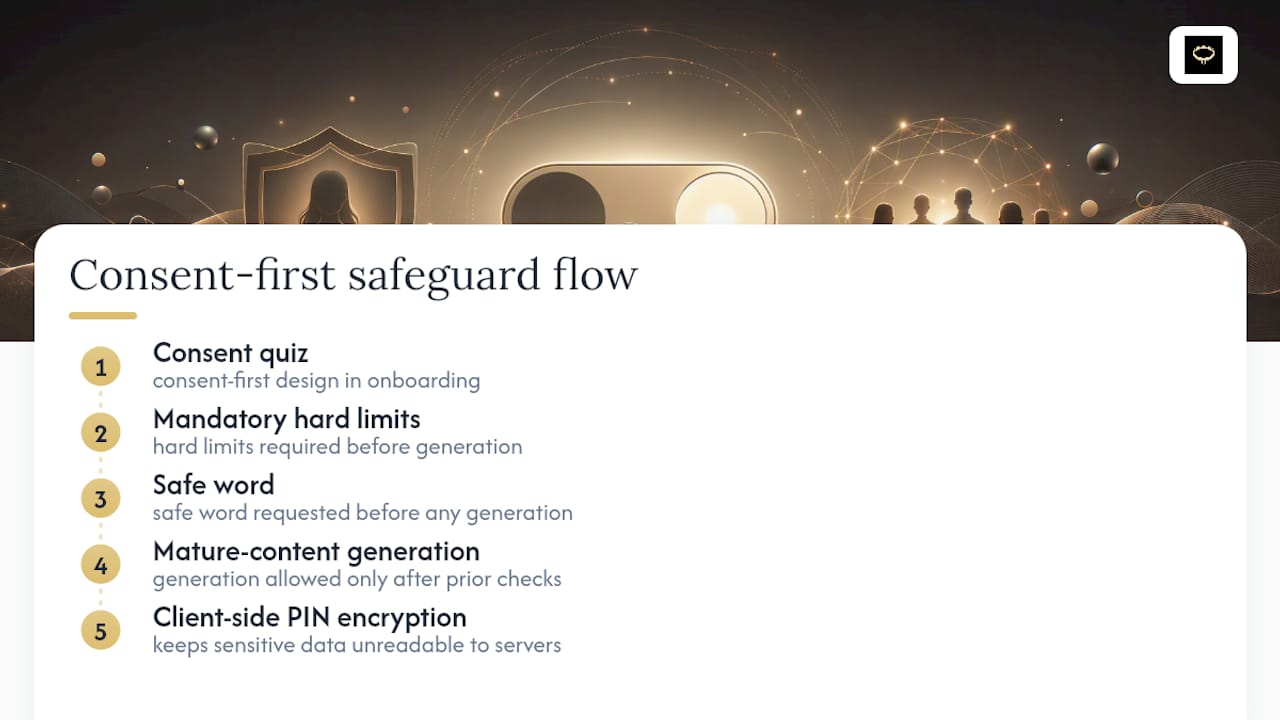
Mistrix builds this thinking into onboarding itself, using a consent-first design with mandatory hard limits and a safe word before any mature content generation happens, and client-side PIN encryption that keeps sensitive data unreadable even to Mistrix’s own servers.
Want Mature Content With Privacy Built In From the Start?
Flipping a toggle on Reddit or X gets you access to mature content, but it doesn’t give you control over what happens after that, who sees your activity, or how your preferences get stored. Some platforms take a different approach: instead of one blunt switch, you go through a consent quiz and set mandatory hard limits and a safe word before any AI-generated scene, and every sensitive detail gets locked behind a client-side PIN that the service cannot read.
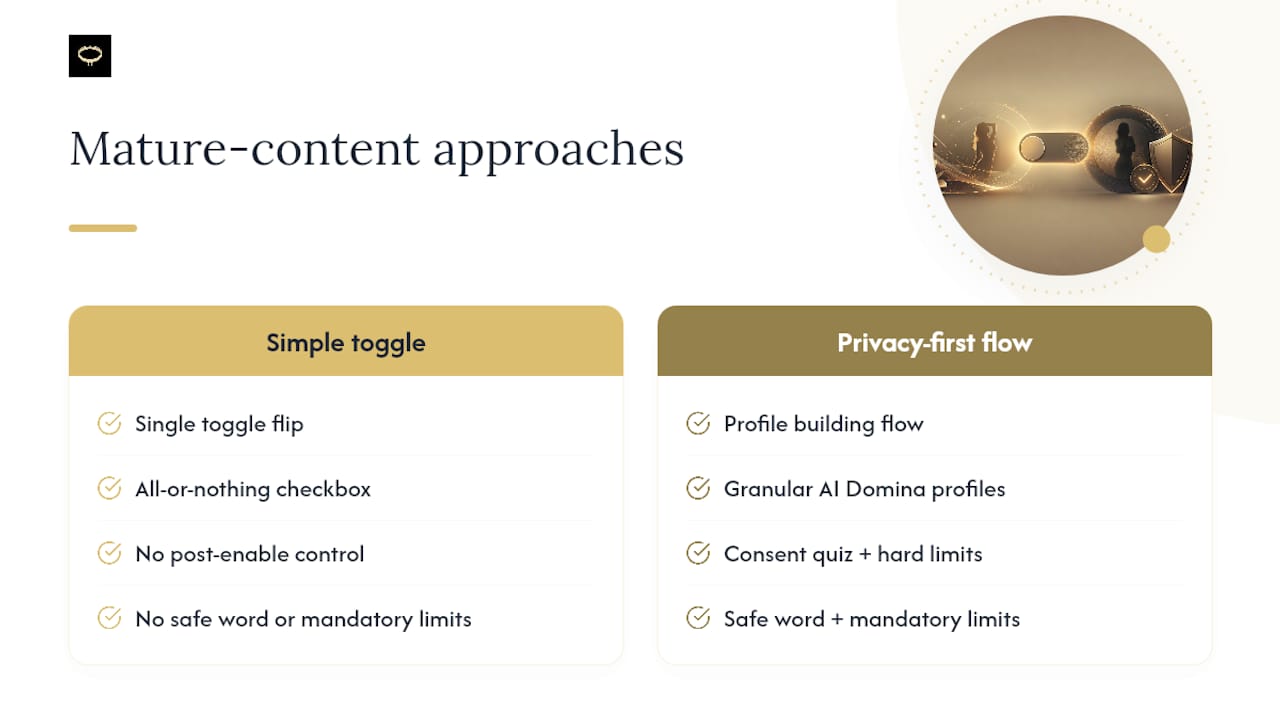
If you’re exploring BDSM and fetish content and want granular control instead of an all-or-nothing setting, browse the AI Domina personalities and start building a profile that reflects your actual preferences, not just a checkbox you flipped once and forgot about.
Sources
- How do I view NSFW communities? - Reddit Help Center
- How to disable or enable NSFW content in Reddit - HowToGeek
- How to Disable or Enable NSFW Content on X (Twitter) - Yahoo
- Content intended for mature audiences, Tumblr Help Center
FAQ
How Do I Turn on NSFW Mode?
Log into your account on the platform’s website, find the mature or sensitive-content setting in privacy or feed preferences, turn it on, then fully close and reopen the mobile app.
How Do I Turn Off NSFW Mode?
Reverse the same web setting you used to enable it, since most platforms use one switch for both directions, and restart the app afterward to confirm the change took effect.
How Do I Enable Mature Content on Grok?
Check your account or profile settings in the web version of the platform first, since AI chat apps typically roll out mature-content or “18+” toggles to browser accounts before mobile.
Why Does My NSFW Toggle Keep Resetting?
This usually means the app cached an old setting or you’re logged into a second account. Clear the cache, sign out and back in, and confirm you only have one active session.
Is There a Way to Get Mature AI Content With More Privacy Control?
Yes. Platforms like Mistrix build consent and privacy into the setup itself, using hard limits, a safe word, and client-side PIN encryption instead of a single toggle you flip and hope holds.